Optimizing your website’s Google crawlability and indexing is a cornerstone of effective search engine optimization (SEO). Despite its significance, this crucial aspect is often overlooked. Crawlability ensures that search engines can discover and interpret your website—without it, your pages will struggle to rank or appear in search engine results pages (SERPs).
At Running Digital, we specialize in organic SEO and have a proven track record of elevating brands’ online visibility. In this guide, we’ll share 10 actionable steps to improve your site’s Google crawlability and indexing, empowering search engines to navigate your site more effectively and potentially boosting your rankings.
Need expert assistance with your SEO strategy? Contact us to learn more about our services.
Table of content
Improve Page Loading Speed
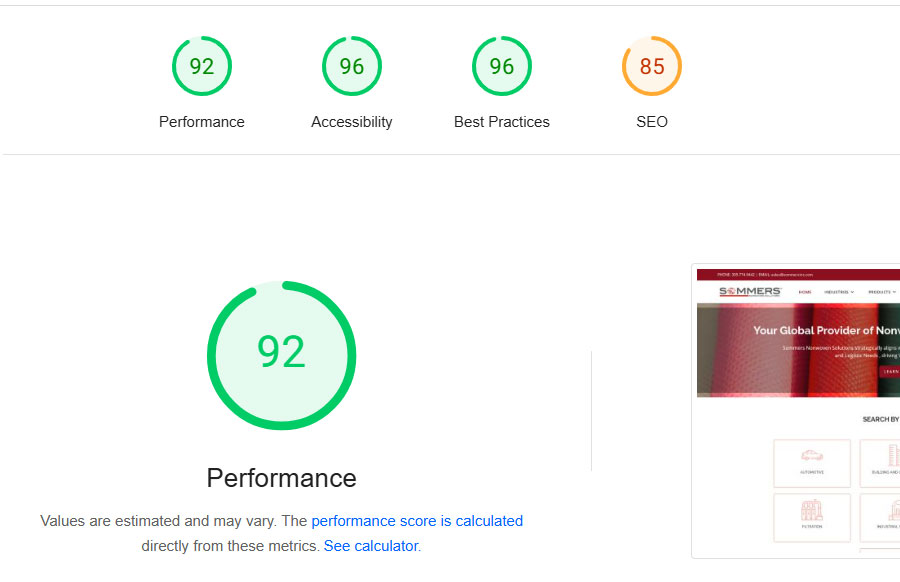
Page loading speed is vital for user experience and significantly impacts crawlability. Slow-loading websites are less likely to be crawled and indexed efficiently. Use Google’s PageSpeed Insights tool to evaluate your site’s performance and get recommendations for improvement. Key steps to enhance page speed include:
- Upgrading your hosting plan for better performance
- Compressing images and using appropriate formats (e.g., JPEG for photos, PNG for graphics)
- Reducing the size of CSS, JavaScript, and HTML files
- Enabling browser caching to store frequently accessed resources locally
- Minimizing redirects and removing unnecessary ones
- Eliminating unused third-party scripts or plugins
Optimize Core Web Vitals
Core Web Vitals are essential metrics that Google uses to assess user experience on your site. Optimizing these vitals is critical for improving crawlability. The three main Core Web Vitals are:
- Largest Contentful Paint (LCP): Measures loading performance from a user’s perspective.
- Interaction to Next Paint (INP): Gauges responsiveness and interactivity.
- Cumulative Layout Shift (CLS): Evaluates visual stability of the page.
Google’s PageSpeed Insights tool can help identify issues and suggest fixes for these metrics.

Strengthen Internal Link Structure
Internal links guide crawl bots through your website, helping them discover and index new pages. A logical internal link structure makes it clear which pages are most important and how they relate to each other. Aim to:
- Link main category pages to relevant subpages
- Connect blog posts and long-form guides to key service or product pages
- Follow best practices to create a seamless linking structure—check out our blog on internal linking for more tips.
Fix Broken Links
Broken links disrupt crawlability by preventing bots from accessing certain pages. Regularly audit your site for broken links using tools like Google Search Console, Screaming Frog, or Google Analytics. Once identified, broken links should be:
- Redirected to the correct page
- Updated to point to a valid URL
- Removed if they’re no longer relevant
Conduct a Site Audit
A site audit helps you identify issues affecting Google crawlability and indexing. Start by checking the percentage of indexed pages using Google Search Console’s Page Indexing Report. If your indexability rate is below 90%, investigate potential issues. Use the URL Inspection Tool to verify that newly published pages are being indexed and request indexing if necessary.
Remove Low-Quality or Duplicate Content
Duplicate or low-quality content can confuse crawl bots and negatively impact crawlability. Use Google Search Console to identify duplicate URLs or low-value content. Ensure that all content is:
- Unique, original, and informative
- Free from spelling and grammar errors
- Valuable to your audience
Submit Your Sitemap to Google
Submitting a sitemap via Google Search Console ensures that search engines can find and crawl your pages more effectively. Sitemaps are beneficial for:
- Large websites with numerous pages
- Sites frequently updated with new content
- Websites lacking strong internal linking structures
Review Your Robots.txt File
Your robots.txt file provides web crawlers instructions on navigating your site. Incorrect configurations can block pages you want indexed. Review your robots.txt file by visiting yourdomain.com/robots.txt, and ensure it aligns with your crawlability goals. If unsure, seek professional assistance.
Check Canonical Tags
Canonical tags prevent duplicate content issues by specifying which page version should be indexed. Misconfigured tags can lead to crawl bots prioritizing the wrong pages. Use the URL Inspection Tool in Google Search Console to identify and fix rogue canonical tags.
Eliminate Redirect Chains
Redirect chains—where multiple redirects occur between the original URL and the destination—hinder crawlability. Tools like Screaming Frog and Redirect-Checker.org can help you identify and resolve these chains, ensuring smoother navigation for both users and bots.

Boost Your Online Visibility by Running Digital
Enhancing your website’s Google crawlability and indexing is crucial for improving rankings and online visibility. However, implementing these steps can be complex. If you need expert support with technical SEO or crafting a winning organic strategy, the team at Running Digital is here to help.
Contact us today to take your SEO to the next level!